How One App Held an Availability Group Hostage
by Michal Kovaľ on 25/05/2021In the world of SQL Server, TEMPDB is often called the "public dumping ground." We expect it to be busy, but we also expect it to clean up after itself.
Read moreSometimes is nice to have a tool/report which could allow you to see how much your backup storage is degraded over time. Especially by fragmentation and auto growth/shrink operations. But it often requires extensive spending of administrators’ time to setup baseline monitoring, collecting data and also analyzing them. I founded one useful way how to save your time.
It also has some prerequisites. I assuming you are not cleaning up your backup history table (as usual :) ) and backing up your databases to storage which hold some database files. So it is mainly useful in smaller environments with smaller storage where data files are sharing same DAS or centralized SAN solution with shared raidgroup.
Then you can use my script to extract that information:  StorageThr.sql
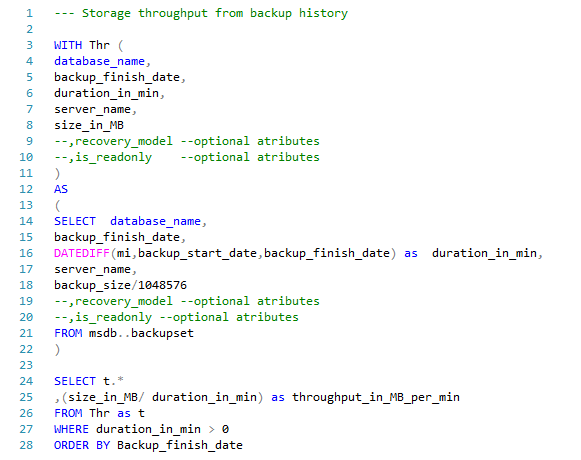
As a result you will get a list of values with a throughput_in_MB_per_min column per every backup made. Then it can be exported to the reports or graphs like this one:
Michal Tinthofer is the face of the Woodler company which (as he does), is fully committed to complete support of Microsoft SQL Server products to its customers. He often acts as a database architect, performance tuner, administrator, SQL Server monitoring developer (Woodler SMT) and, last but not least, a trainer of people who are developing their skills in this area. His current "Quest" is to help admins and developers to quickly and accurately identify issues related to their work and SQL Server runtime.
In the world of SQL Server, TEMPDB is often called the "public dumping ground." We expect it to be busy, but we also expect it to clean up after itself.
Read moreI think there is more simple and harmless way. First we need to understand the process of tempdb collation setting.
Read moreSo after some time we are returning to presenting roadshow starting with Show IT Bratislava. Lets have a look at our session list.
Read more