Imagine opening SQL Server Management Studio (SSMS) on a Monday morning and finding… nothing. Your databases are gone from the Object Explorer. You try a different machine, you try a different version of SSMS, but the result is the same. Empty.
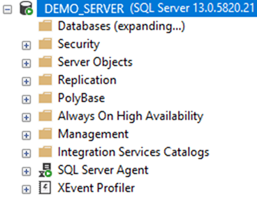
This was the reality for one of our customers. The databases had been "invisible" for more than 24 hours. While the instance was running, the management layer was paralyzed.
Phase 1: The Ghost in the Machine
The first instinct was to look for locks. The customer checked running processes, but found no obvious blockers. Initially, we suspected a lock timeout issue, but the Activity Monitor showed no long-term schema locks.
Then we spotted it: A Backup process that was essentially a zombie. It had been running for 38 hours with 0 CPU activity, 0 reads, and 0 writes. It was stuck in a perpetual wait state: HADR_SYNC_COMMIT.
Phase 2: The Master Database Misdirection
The mystery deepened when we realized that this backup process was holding locks in the master database, specifically blocking access to sys.databases. This is why SSMS couldn't list anything.
However, a HADR_SYNC_COMMIT wait technically shouldn't happen on the master database. This was a crucial realization: the locked tables in master were just a symptom, not the cause. We were looking at a ripple effect from a problem located elsewhere.
Phase 3: 600,000 Events and the "Smoking Gun"
To find the root cause, we deployed Extended Events (XEvents). Within seconds, we captured over 600,000 events. After heavy filtering and analysis, we narrowed it down to 6 important records.
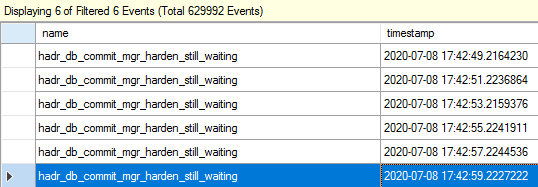
The events described a specific failure:
“Occurs when a committed LSN in primary has not been notified for the hardening from all synchronous-commit secondary replicas for more than 2 seconds.”
The Diagnosis: During a minor network glitch, a specific packet from the backup operation was lost. The primary node was waiting for the secondary to confirm that the data block had been written to disk (Harden). Because that confirmation never arrived, the session entered an infinite loop, retrying every 2 seconds and blocking system resources in the process.
Phase 4: The Non-Disruptive Cure
We needed to break the loop without crashing the production environment. We executed a surgical four-step plan:
- Switched the Availability Group (AG) to Manual failover mode on both nodes.
- Temporarily changed the replication to Asynchronous.
- Immediately, the stuck backup ROLLBACK "caught up" and finished.
- Switched back to Synchronous replication and restored Automatic failover.
The Lesson: When the system looks broken at the surface (SSMS/master), the real culprit often lies in the "plumbing" of the high-availability layer. A true SQL Master doesn't just fix the symptom; they trace the wait state to its origin.