When a Cloud Database Reached 100% CPU
During a normal business morning, a production database running on Azure SQL Managed Instance reached 100% CPU utilization and became almost unresponsive. Although the immediate incident was mitigated, the underlying performance problem remained.
Application requests accumulated, response times increased dramatically, and SOS_SCHEDULER_YIELD emerged among the dominant waits, indicating significant pressure on SQL Server’s schedulers.
Our team began investigating the active workload to identify the source of the excessive CPU consumption.
The monitoring data pointed to a particular Query Hash associated with statements that occasionally required up to 176 seconds to complete.
The affected queries originated from the core of a business process management (BPM) workflow engine, specifically operations involving process variables and event subscriptions.
At first glance, the symptoms suggested a familiar SQL Server performance problem. However, the investigation eventually revealed several interconnected issues involving execution plans, index design, Query Store, automated tuning, and cloud storage architecture.
The Initial Investigation: A Chain Reaction
The investigation unfolded in four stages:
- An index rebuild provided immediate but temporary CPU relief.
- Composite indexes eliminated inefficient access patterns and reduced unnecessary reads.
- Two separate plan-management regressions required changes in Query Store.
- Once CPU pressure was stabilized, storage latency emerged as the remaining bottleneck.
The first analysis revealed several concerning findings:
- Important indexes showed fragmentation exceeding 98%.
- Data distribution statistics were outdated.
- The Query Optimizer was working with inaccurate cardinality estimates, contributing to an inefficient join strategy and a severely degraded execution plan.
During the initial incident, our team manually rebuilt the primary index supporting process-variable lookups as an immediate mitigation.
The operation refreshed the associated index statistics and invalidated the problematic cached execution plan.
CPU utilization dropped immediately.
Performance recovered, but the weaknesses in the index structure and execution strategy remained.
While our team tested composite indexes and consulted the workflow-engine vendor, the problem resurfaced approximately three weeks later. The production instance remained near 100% CPU utilization for roughly ten business hours, confirming that a durable index change was needed.
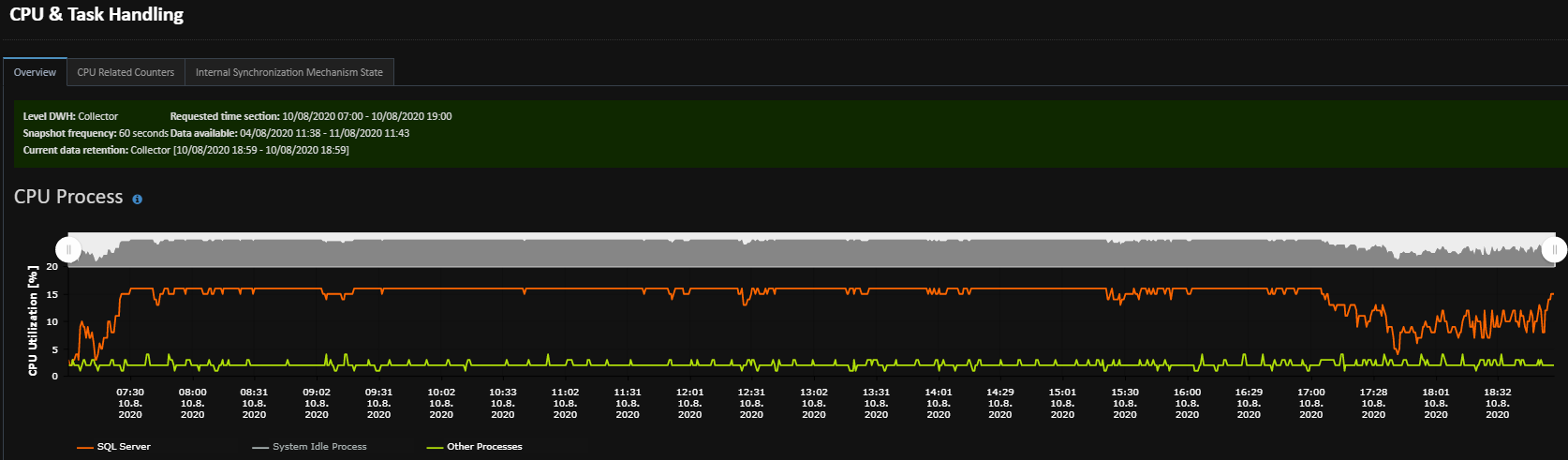
Figure 1. A recurring CPU saturation incident kept the production instance near 100% utilization for approximately ten hours before the new indexes were deployed.
The new composite indexes were deployed after this prolonged recurrence.
Investigation No. 1: When an Index Seek Reads a Million Rows
An Index Seek is often interpreted as evidence that SQL Server is accessing data efficiently.
But is that always true?
The first problematic table stored workflow process variables and contained more than 10 million rows in production. A separate test environment contained approximately 400,000 rows.
The application queried this table using several filtering conditions, including the variable’s integer value, name, data type, and associated task identifier.
The existing non-clustered index, however, used only the integer value as its key column.
Other filtering columns were either included as non-key columns or absent from the index entirely.
The Hidden Cost of Residual Predicates
The graphical execution plan displayed an Index Seek operator.
However, inspecting the operator properties revealed the real problem.
SQL Server could efficiently navigate the B-tree using the indexed integer value through the Seek Predicate.
The remaining conditions were evaluated through a residual Predicate.
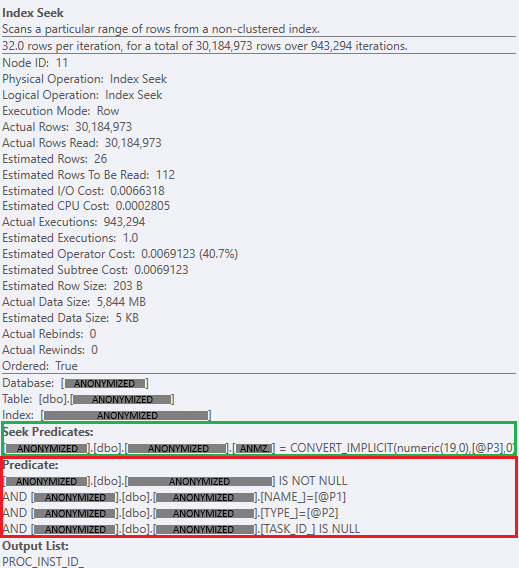
Figure 2. Index Seek properties revealing over 30 million rows read across 943,294 operator executions, with additional filtering performed through residual predicates.
If one million records shared the same integer value, SQL Server could still need to examine that entire qualifying range before determining which rows matched the remaining conditions.
The operator looked efficient in the graphical plan, but its actual workload told a different story.
Tests on a dataset of approximately 400,000 rows identified more than 3,500 logical reads per execution, accompanied by tens of milliseconds of CPU time. The production table contained more than 10 million rows, but these test measurements should not be interpreted as production logical-read counts.
With the same access pattern and thousands of calls per minute, the significantly larger production dataset posed an even greater performance risk.
Designing a Composite Covering Index
After checking cached execution plans and the index’s usage by other workloads, our team proposed replacing the existing index with a composite nonclustered index.
The revised key structure included the columns used by the query’s filtering conditions. The following example illustrates the anonymized index design:
CREATE NONCLUSTERED INDEX [IX_ProcessVariables_Lookup]
ON [dbo].[ProcessVariables]
(
[VariableValueInt] ASC,
[VariableName] ASC,
[VariableType] ASC,
[TaskId] ASC
)
INCLUDE ([ProcessInstanceId])
WITH
(
PAD_INDEX = ON,
STATISTICS_NORECOMPUTE = OFF,
SORT_IN_TEMPDB = ON,
DROP_EXISTING = ON,
ONLINE = ON,
ALLOW_ROW_LOCKS = ON,
ALLOW_PAGE_LOCKS = ON,
FILLFACTOR = 80
);
Note: The SQL example has been anonymized. Object and column names are illustrative, while the index structure and configuration reflect the investigated case.
The index was designed to narrow the search more effectively and avoid unnecessary residual evaluation across large groups of rows.
Testing confirmed a substantial improvement.
Logical reads fell to a fraction of their previous level, while reported CPU time and execution duration dropped to approximately zero milliseconds at the available measurement resolution.
The improvement demonstrated that an Index Seek operator alone does not guarantee efficient access. Its actual seek conditions and residual predicates must also be examined.
Investigation No. 2: Cardinality and Redundant Indexes
The second performance issue involved a table storing workflow event subscriptions.
The affected query joined event-subscription records with process-execution data and filtered on three important attributes:
- Execution identifier.
- Event name.
- Event type.
Two separate indexes had accumulated on the table. The first was the default workflow-engine index on the execution identifier. The second was a custom index on the event name and event type.
Understanding the Data Distribution
Our team compared the cardinality and selectivity of the filtering columns.
The execution identifier was substantially more selective than the event-related attributes.
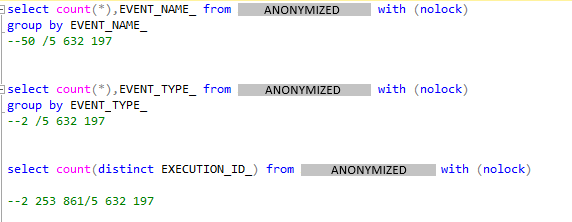
Figure 3. Cardinality analysis of the event subscription table showing the significantly higher selectivity of EXECUTION_ID_ compared with EVENT_NAME_ and EVENT_TYPE_.
This finding was important because the query’s access pattern could benefit from an index that began with the execution identifier and continued with the additional filtering columns.
Instead of maintaining two partially useful indexes, our team designed a single composite index that supported the relevant query patterns.
An anonymized example of the revised index structure is shown below:
CREATE NONCLUSTERED INDEX [IX_EventSubscriptions_Execution]
ON [dbo].[EventSubscriptions]
(
[EXECUTION_ID_] ASC,
[EVENT_NAME_] ASC,
[EVENT_TYPE_] ASC
)
WITH
(
PAD_INDEX = ON,
STATISTICS_NORECOMPUTE = OFF,
SORT_IN_TEMPDB = ON,
DROP_EXISTING = ON,
ONLINE = ON,
ALLOW_ROW_LOCKS = ON,
ALLOW_PAGE_LOCKS = ON,
FILLFACTOR = 80
);
The original implementation also removed the redundant custom index after the replacement strategy had been validated.
Why Fewer Indexes Can Mean Better Performance
Every additional non-clustered index creates maintenance overhead.
For write-heavy tables, INSERT and UPDATE operations may need to maintain several index structures.
Consolidating overlapping indexes can therefore reduce write overhead while improving read performance, provided the replacement supports the necessary workloads.
Cached-plan analysis confirmed that queries previously requiring Key Lookup operations could use the revised covering index.
The result was a more efficient access strategy with fewer indexes to maintain.
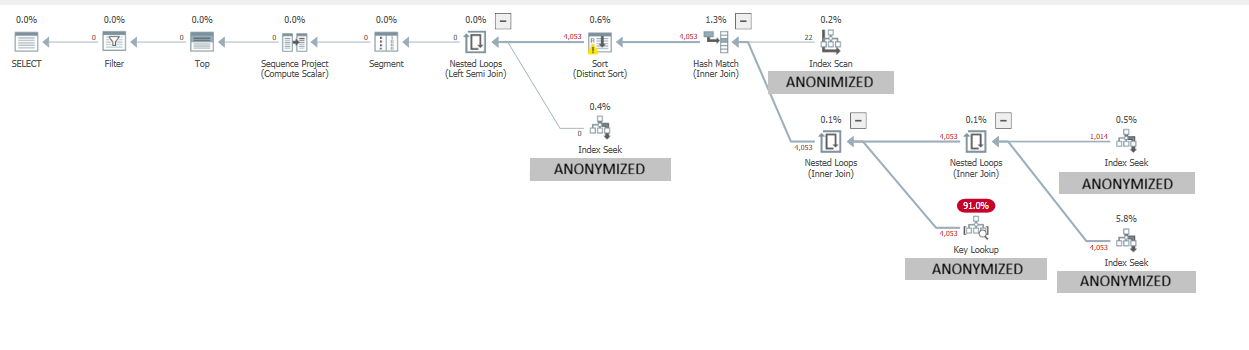
Figure 4. Original execution plan showing a costly Key Lookup operation before index optimization.
Why Doesn’t the Software Vendor Provide These Indexes by Default?
The findings raised an obvious question.
If the revised indexes were so effective, why were they not part of the workflow engine’s default database schema?
Our team discussed the findings directly with the software vendor’s development team.
The vendor explained that the process-variable table was extremely write-intensive.
Additional indexes might improve performance for one customer’s queries but introduce unnecessary INSERT and UPDATE overhead for others.
Furthermore, customers could have significantly different data distributions, process definitions, and filtering patterns.
A broadly distributed workflow engine therefore needs to balance read performance against the maintenance cost of its default indexes.
This discussion highlighted an important principle: an index that is ideal for one production workload is not necessarily appropriate for every installation of the same application.
Targeted database tuning must consider the actual workload rather than relying exclusively on generic index recommendations.
Investigation No. 3: When Query Store Becomes Part of the Problem
After the index changes, two distinct execution-plan management problems emerged at different times.
First, a legacy Query Store forcing directive interfered with the improved access strategy. Approximately two weeks later, Azure Automated Tuning introduced a separate regression that required a different response.
Step 1: Removing a Failing Legacy Forced Plan
Shortly after the new indexes were deployed, Query Store revealed an older, manually forced plan for the affected query.
Under certain conditions, SQL Server failed to compile or apply this legacy forced plan.
When forcing failed, SQL Server fell back to an inefficient alternative execution plan.
The resulting regression prevented the workload from consistently benefiting from the new composite indexes.
Our team removed the outdated forcing directive, allowing the optimizer to choose an execution plan using the improved index structures.
Step 2: Stabilizing the Plan After Automated Tuning Regression
Approximately two weeks later, new CPU spikes appeared. The investigation linked these regressions to Azure Automated Tuning evaluating alternative execution strategies.
Some of the alternative plans performed poorly for this workload, despite the improved indexes already being in place.
After verifying a stable, efficient execution plan, our team explicitly forced that plan in Query Store to reduce the risk of further regressions.
Monitoring data confirmed that the same query experienced two separate performance regressions, first before the new indexes were deployed and later following automated tuning intervention.
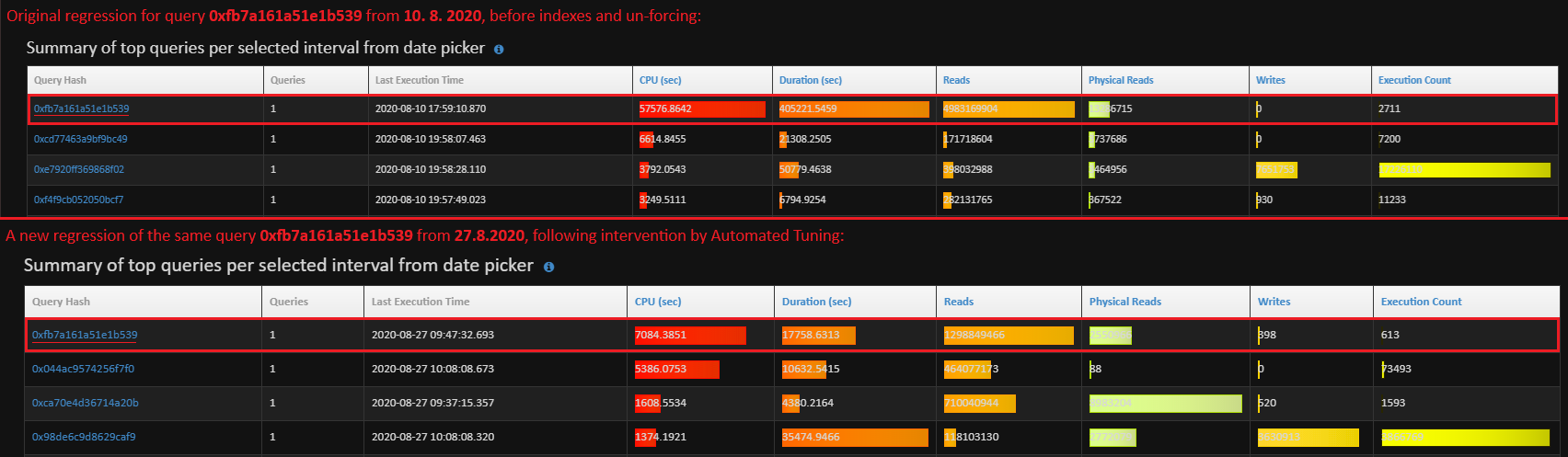
Figure 5. Performance regression of the same query on August 10 and August 27, showing renewed CPU consumption and logical reads following automated tuning intervention.
The experience demonstrated that query optimization does not end with index creation.
Execution-plan stability matters just as much as the physical index design.
Investigation No. 4: When the CPU Problem Disappears but Queries Remain Slow
The final phase of the investigation revealed another performance bottleneck.
CPU utilization had stabilized, but some queries still required approximately 5.9 seconds to complete.
A detailed examination of the execution plan showed that approximately 5.5 seconds were spent waiting on PAGEIOLATCH_SH.
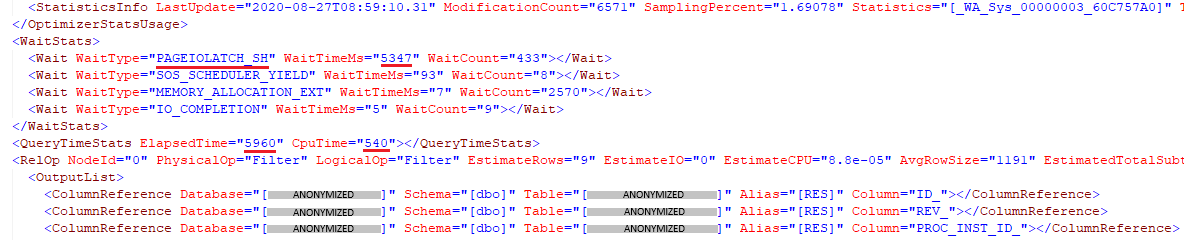
Figure 6. Execution plan statistics showing PAGEIOLATCH_SH as the dominant cumulative wait type during a query execution lasting approximately six seconds.
This wait type indicated that the queries were waiting for data pages to be read into memory.
The database was no longer primarily limited by CPU processing capacity.
It was waiting for storage.
The Cloud Infrastructure Change
Further investigation revealed that the environment had undergone an infrastructure change.
CPU capacity had been increased from four to eight virtual cores.
At the same time, the Azure SQL Managed Instance service tier had changed from Business Critical to General Purpose.
The original Business Critical configuration used high-performance local SSD storage.
The General Purpose configuration relied on remote storage with different latency, IOPS, and throughput characteristics.
Although the increased CPU capacity helped address processor-related waits, the storage change introduced a different limitation.
The Storage Wait-Time Comparison
Monitoring data revealed a substantial increase in I/O-related waits following the infrastructure change.
The comparison covered two monitoring periods with different aggregation intervals: five minutes in the later period and fifteen minutes in the earlier period.
After accounting for the difference in sampling intervals, the monitoring data indicated significantly higher accumulated storage waits in the later period. PAGEIOLATCH_SH was a major contributor to this increase.
These waits represented cumulative waiting time across concurrent operations, not the elapsed duration of a single query.
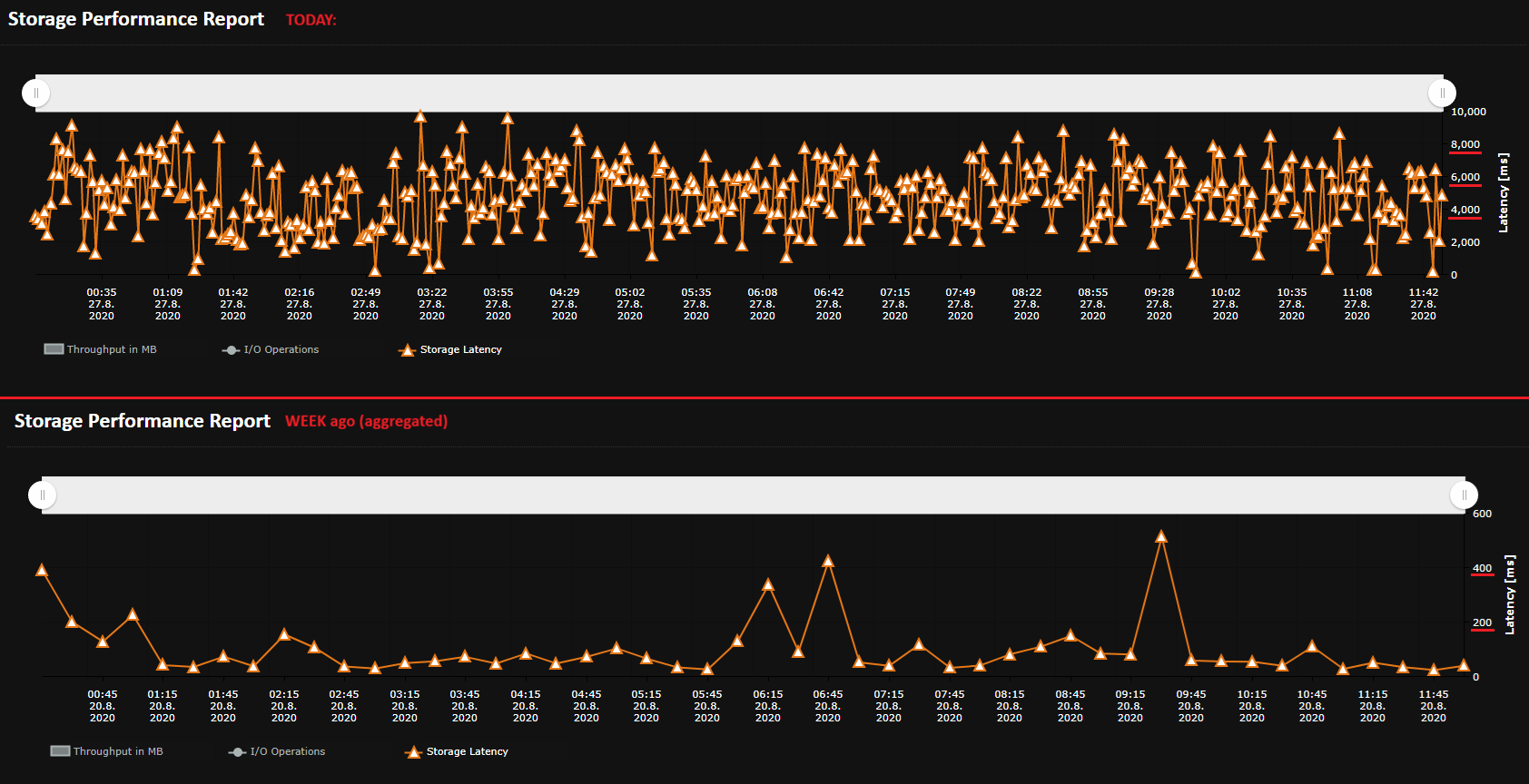
Figure 7. Storage latency across two monitoring periods, shown with different aggregation intervals and axis scales.
The findings explained why statements remained slow after CPU utilization stabilized: further query tuning could not remove an infrastructure bottleneck, and the service tier’s storage characteristics had to match the workload.
On Azure SQL Managed Instance, storage-scaling options depend on the selected service tier, its storage architecture, and the I/O limits currently constraining the workload. Where monitoring confirms that further query tuning will not remove the bottleneck, increasing the size of the affected database files or distributing data across additional files may improve available throughput in configurations where I/O capacity scales with provisioned storage. The expected benefit should be validated against the applicable service-tier limits and observed latency, IOPS, and throughput metrics rather than treated as a universal remedy. Adding files also introduces operational work. Existing data does not automatically rebalance across newly added files, so index rebuilds or other planned data-movement operations may be required to redistribute allocations within the filegroup. If performance takes priority over minimizing storage cost, the customer may also need to accept deliberately preallocated but initially unused database space to reach the required I/O scaling target.
At the time of writing, Azure SQL Managed Instance also offers the Next-gen General Purpose tier, which uses an upgraded storage architecture and allows IOPS to be scaled at the instance level. Because its performance quotas are shared across the instance, individual database files no longer need to be enlarged solely to raise their I/O limits, avoiding deliberately inflated files and unnecessary free space used only for performance gain.
These design, implementation, and validation considerations deserve a separate SMT Story and will be covered in a future article.
Key Lessons for Database Specialists
- An Index Seek is not automatically efficient. Always inspect Seek Predicates, residual Predicates, actual row counts, and logical reads before concluding that an access path is optimal.
- Index key order must reflect the workload. Column selectivity, equality predicates, range predicates, and actual query patterns all matter when designing composite indexes.
- More indexes are not always better. Consolidating overlapping indexes can reduce maintenance overhead on write-heavy tables while preserving efficient access for critical queries.
- Query Store requires active management. Forced plans can become unsuitable or fail to apply. Plan stability should be monitored after changes to indexes, statistics, or workload characteristics.
- Cloud performance depends on both compute and storage. Increasing vCore capacity does not resolve I/O latency caused by an unsuitable storage tier.
SMT Stories Takeaway
Database performance depends on more than CPU capacity or the presence of indexes. Understanding actual execution plans, workload-specific index requirements, and cloud storage limitations is essential to achieving stable, sustainable performance.