We will be presenting at ShowIT 2018.
by Michal Tinthofer on 08/01/2018So after some time we are returning to presenting roadshow starting with Show IT Bratislava. Lets have a look at our session list.
Read moreIn high-performance SQL Server environments, how you "slice" your CPU resources is just as important as how many cores you have. We recently tackled a case where a customer was plagued by high SOS_SCHEDULER_YIELD and CXPACKET waits. The solution wasn't adding more power... it was restoring balance.
The Symptom: Heavy Waits and Uneven Load
The customer reported a sluggish system where CPU waits weren't just high... they were inconsistent. Upon investigation, we noticed that some nodes were working six times harder than others. This imbalance was causing a massive surge in:
The Investigation: The "Imperfect" VM Slice
The physical host was a powerhouse with 64 CPUs (arranged in a 2 x 32 layout). However, the Virtual Machine (VM) was allocated 60 CPUs, presumably to leave 4 cores for the hypervisor.
While this seemed logical for the hypervisor, it created a "math problem" for SQL Server’s Soft-NUMA:
This slight asymmetry having nodes of different sizes created a "scheduling friction" where the SQL OS scheduler couldn't distribute work evenly, leading to the massive disparity in wait times across nodes.
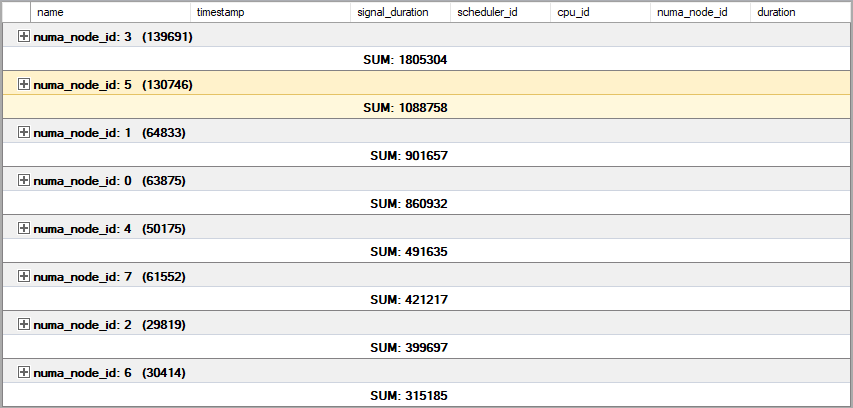
The Fix: Simplicity Over Complexity
Since the underlying VM configuration was already segmented into 4 nodes, we decided that the additional layer of Soft-NUMA was doing more harm than good. We recommended a return to a simpler, symmetrical topology.
We disabled Soft-NUMA using the following command:
ALTER SERVER CONFIGURATION SET SOFTNUMA = OFF;
GO
The Results: Stability in Symmetry
After restarting the service to apply the change, the 60 CPUs were reorganized into 4 clean, identical nodes of 15 CPUs each. The impact was immediate:
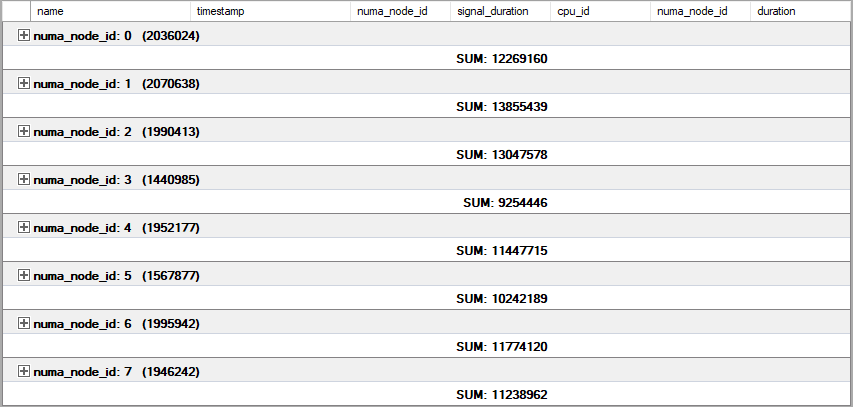
Key Takeaway
More features aren't always better. Soft-NUMA is a powerful tool for modern high-core CPUs, but if your VM vCPU count doesn't divide cleanly into symmetrical nodes, it can create "ghost" bottlenecks. When in doubt, check your node alignment. Symmetry is often the key to sub-millisecond performance.
Michal is a technically proficient SQL Server Specialist with a proven track record in resolving incidents and implementing changes within large-scale database infrastructures, ensuring maximum availability of services. Concurrently, as a Digital Content and Marketing Specialist, his priority is building strong online brand identities through strategic communication and creative storytelling. He consistently seeks new ways to enhance digital interaction, believing quality digital communication is key to success in today's connected world.
So after some time we are returning to presenting roadshow starting with Show IT Bratislava. Lets have a look at our session list.
Read moreRecently, we have got a case where our customer requested to implement archiving strategy for their DWH. We wanted to share with you how we approached this and what was the final output.
Read moreLast week of May we had the pleasure of sponsoring another great data event - Data Point Prague, held at the Comfort Hotel in Prague.
Read more