Executive summary: This case explains how a severe HADR_SYNC_COMMIT spike in a synchronous-commit SQL Server Always On Availability Group was traced to a degraded and unintended network path rather than to SQL Server query processing itself. The investigation combined AG metrics, controlled commit-latency testing, Extended Events, and infrastructure validation to prove the bottleneck and confirm that the subsequent network redesign resolved the observed issue.
In a synchronous-commit Always On Availability Group, HADR_SYNC_COMMIT represents time spent on the primary replica waiting for confirmation that the relevant log block has been hardened on the synchronous secondary replica. In this case, that wait accumulated into materially increased transaction commit latency, which is why the investigation focused on the full AG synchronization path from log generation through send and remote hardening.
Phase 1: Detailed Monitoring & Identification
To pinpoint the bottleneck, we implemented a three-tier testing strategy:
AG Metrics Tracking: Using Performance Monitor and custom SQL Agent jobs that logged to the SMT_Operations database, we collected AG metrics every 10 seconds, including log send queue size, send rate, redo queue size, redo rate, synchronization state, log bytes flushed, and bytes sent to the replica and transport.
Transaction Commit-Latency Testing: We created a dedicated job, SMT_Adhoc_InsertTest, which inserted a single 4-byte row into a dummy table every 10 seconds. By recording timestamps immediately before and after the INSERT, we measured the end-to-end transaction commit latency, including the synchronous AG acknowledgement path.
Internal AG Pipeline Analysis: We deployed an Extended Events session for a 10-minute sample to capture start and finish events from the internal SQL Server components involved between transaction submission and final commit.
The Findings: Commit Latencies of Up to 590 Seconds
The tests showed that the immediate symptom was a severe throughput constraint in the AG synchronization path rather than an inherent limit of the SQL Server engine:
Large Log Bursts and Queueing: During the nightly OxyImport/Export workload, the production database generated approximately 50 MB/s of transaction log, with peaks above 200 MB/s for tens of seconds. This added several gigabytes to the log_send_queue. Because log blocks are processed in order, small transactions submitted behind this workload also waited for earlier log blocks to be transmitted and hardened on the secondary replica.
Extreme Commit Latency: During the day, recurring commit latencies ranged from approximately 500 ms to 4 seconds, with occasional delays of 30-80 seconds. During the 01:00-03:00 workload window, individual measurements reached 590, 360, and 575 seconds. Aggregated HADR_SYNC_COMMIT wait time was approximately 500,000-800,000 seconds per day, with the nightly window accounting for roughly half of the daily total.
Bottleneck Localization: The Extended Events sample showed the largest elapsed times in the Primary-Send and Primary-RemoteHarden stages. This localized the delay within the AG send and remote-harden acknowledgement path; the later infrastructure investigation identified the underlying network-path limitation. Flow Gates/sec remained at zero, so AG flow-control throttling was not indicated during the test.
Root Cause: Degraded Links and the Wrong Network Path
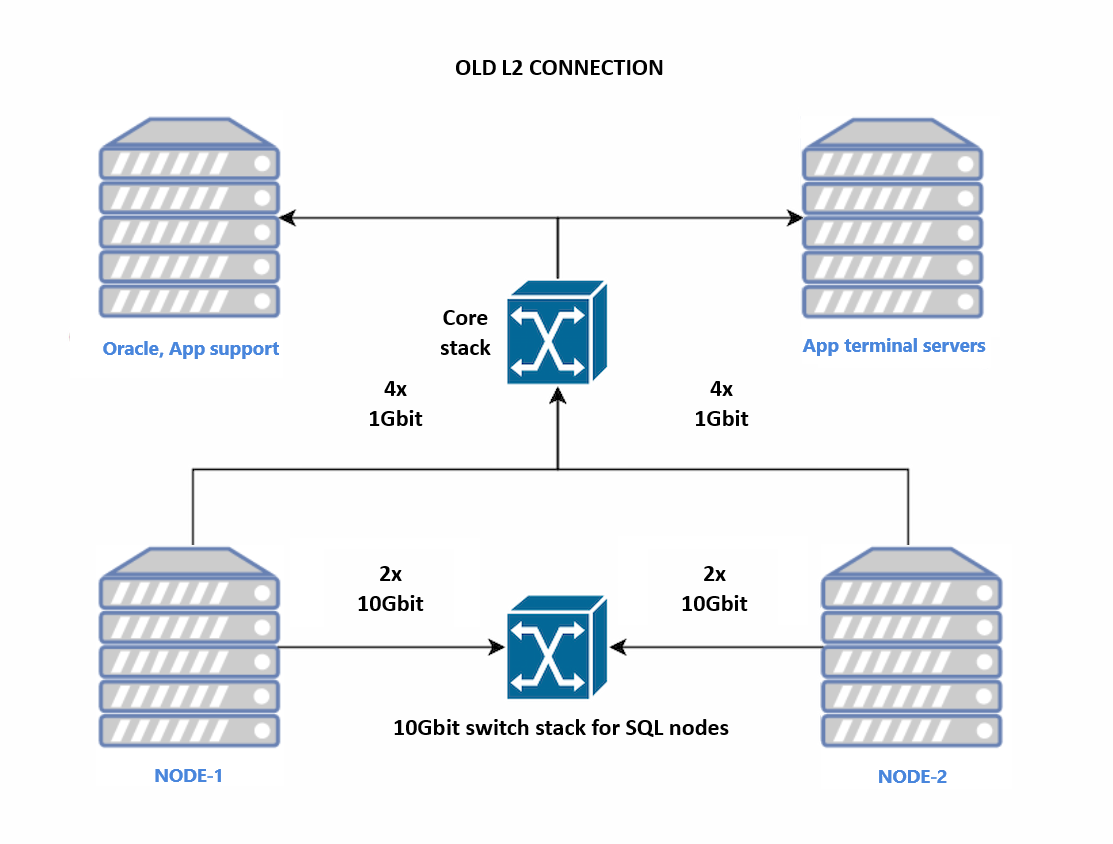
The investigation identified two related infrastructure issues. First, 2 of the 4 paths associated with the secondary node had negotiated down to 100 Mbit/s; those paths were disabled, leaving a temporary 2x1 Gbit/s configuration. Second, because the AG endpoint URLs were defined using FQDNs that resolved to the public IP addresses, and the endpoints were configured with LISTEN_IP = ALL, the AG traffic on port 5022 was established over the public Team #1 interface instead of the intended private Team #2 network. This explained why file-copy testing could use the fast private path while AG traffic followed the slower public path and was observed at approximately 12 MB/s before remediation.
Proposed Solutions & Final Implementation
We presented the client with two options:
Hybrid Solution (4x1 Gbit/s + 2x10 Gbit/s): Keep separate public and private teams and force AG synchronization over the private interface, for example through controlled name resolution. This provided stronger redundancy and performance separation, but a complete private-path failure would require manual intervention to restore AG synchronization over the public path.
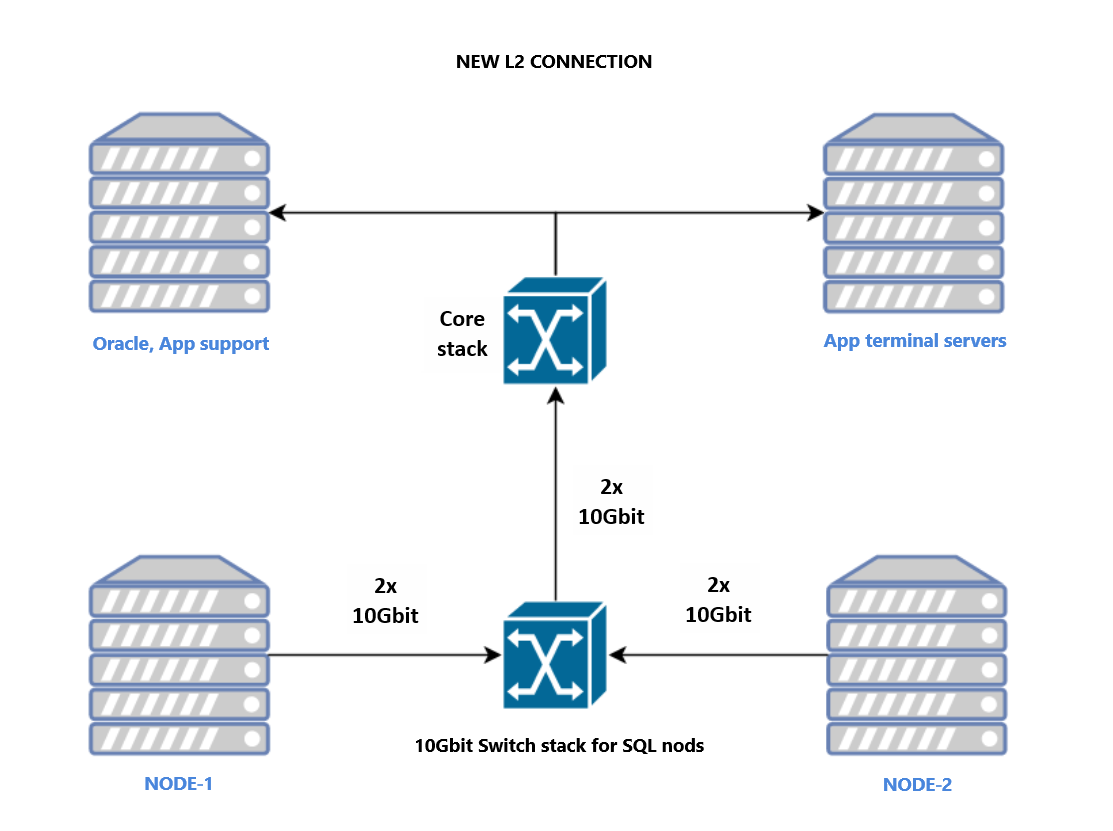
Consolidated 2x10 Gbit/s Solution: Remove the 4x1 Gbit/s team and carry AG synchronization, WSFC heartbeat, and client traffic over the remaining 2x10 Gbit/s team. This was the simpler minimum architecture, although it provided less network-path redundancy than the hybrid option.
The client selected Option 2 as part of the data-center core-switch replacement. The 4x1 Gbit/s connections were removed, while the existing 2x10 Gbit/s links to the dedicated Dell switches were retained. An untagged VLAN 2 was configured on those access ports and connected to the new core infrastructure. The design kept node-to-node synchronization on the dedicated switch path while making the cluster reachable by the rest of the infrastructure through the same team.
OLD L2 Network
NEW L2 Network
Conclusion
After implementation, the review of wait statistics found no renewed increase in HADR_SYNC_COMMIT waits, indicating that the new switching and network configuration resolved the observed bottleneck. The case demonstrates that SQL Server AG performance depends not only on nominal link capacity, but also on link health, DNS resolution, endpoint configuration, and the actual network path used by port 5022 traffic.
Michal is a technically proficient SQL Server Specialist with a proven track record in resolving incidents and implementing changes within large-scale database infrastructures, ensuring maximum availability of services. Concurrently, as a Digital Content and Marketing Specialist, his priority is building strong online brand identities through strategic communication and creative storytelling. He consistently seeks new ways to enhance digital interaction, believing quality digital communication is key to success in today's connected world.
When SQL Server Jobs Suddenly Stop Creating COM Objects
by Michal Kovaľ
on 12/02/2026
Intermittent SQL Server errors are among the most difficult problems to troubleshoot. A job can run successfully hundreds of times and then suddenly start failing. The same error may return days or weeks later, with no obvious change in the code.
Recently, we have got a case where our customer requested to implement archiving strategy for their DWH. We wanted to share with you how we approached this and what was the final output.
Turning Hours into Minutes: How We Solved a SQL Server Indexing Nightmare
by Michal Kovaľ
on 16/04/2026
In the world of database administration, index maintenance is a necessary evil. Done right, it keeps your queries snappy; done wrong, it becomes a resource-hungry monster that eats your maintenance window alive.

.png)