Picture this: Your production monitoring dashboard suddenly turns bright red. You open your performance analytics tool to check the top wait types, expecting the usual suspects like PAGEIOLATCH (slow disks) or CXPACKET (parallelism). Instead, staring back at you is a strange, rarely seen wait type: PREEMPTIVE_OS_QUERYREGISTRY.
This is exactly the mystery we had to solve recently while managing the infrastructure for two of our enterprise clients. As database administrators, we had to dig deep beneath the standard layers of the SQL Server engine. In this post, we’ll explore what this wait type actually means, how it connects to a new feature in SQL Server 2022, and how you can fix it if it hits your environment.
What on Earth is PREEMPTIVE_OS_QUERYREGISTRY?
SQL Server is designed around a principle called Cooperative Scheduling. It runs its own mini-operating system layer called SQLOS, which manages threads and CPU cores to keep database operations fast and isolated.
However, there are times when SQL Server needs to step out of its sandbox and ask the underlying Windows OS for information. When this happens, SQL Server switches to a preemptive mode. It tells Windows: "Here is a thread, go do this task, and I will sit here waiting until you return the answer."
The specific wait PREEMPTIVE_OS_QUERYREGISTRY indicates that SQL Server is waiting for a response from the Windows Registry. Under normal conditions, this wait is negligible occurring briefly during service startup, licensing checks, or when an administrator explicitly reads a registry value using xp_regread. But what happens when it gets stuck in an infinite, aggressive loop?
Telemetry Detective Work
While analyzing the performance data of the two impacted production environments, a clear and problematic pattern emerged. Both environments were running SQL Server 2022, had Query Store turned on, and experienced a massive volume of ad-hoc query compilations (SQL Compilations/sec).
When we lined up the time-series graphs from our monitoring platform, the pieces of the puzzle fell perfectly into place: Spikes in Windows Registry waits mirrored the query compilation spikes down to the exact second.
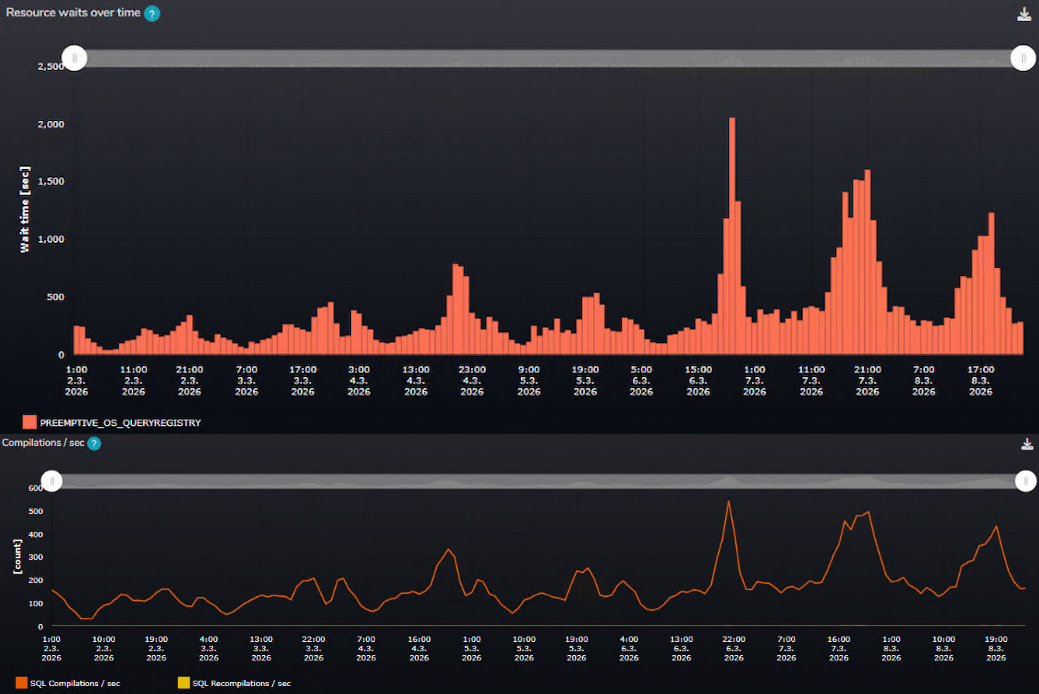
Every single query compilation forced SQL Server to reach out to the OS registry, creating a massive thread scheduling bottleneck.
Investigating the Configuration Behavior
Because this behavior involved deep, internal operations of the engine, we analyzed the infrastructure alignment and opened a case with Microsoft support. The investigation pointed toward a specific configuration behavior related to a new feature introduced in SQL Server 2022: Optimized Plan Forcing.
Our findings indicated that when this feature interacts with an active Query Store, the underlying engine heuristics continue to perform verification checks against the Windows Registry during query compilations. To mitigate this overhead without waiting for official documentation updates, database administrators can safely adjust the following configurations.
The Workaround: How to Fix It
Until Microsoft delivers a permanent fix in an upcoming Cumulative Update (CU), you can completely resolve this issue using a two-step configuration workaround. If your server is suffering from this exact bottleneck, follow these steps:
Step 1: Turn Off Optimized Plan Forcing
You need to disable this configuration option at the individual database level (Database Scoped Configuration). This stops Query Store from utilizing the faulty code path:
USE [YourDatabaseName];
GO
ALTER DATABASE SCOPED CONFIGURATION SET OPTIMIZED_PLAN_FORCING = OFF;
GO
Step 2: Enable Trace Flag 11074
Step one alone isn't enough, because the background engine heuristics will continue to run even if the feature configuration is turned off. To completely silence the excessive registry polling, you must apply the undocumented trace flag 11074.
Add -T11074 to your SQL Server Startup Parameters via the SQL Server Configuration Manager and restart the SQL Server service.
Real-World Results
Once the configuration changes were applied and the services recycled, the results were night and day. The PREEMPTIVE_OS_QUERYREGISTRY wait completely dropped off the charts, falling straight to zero.
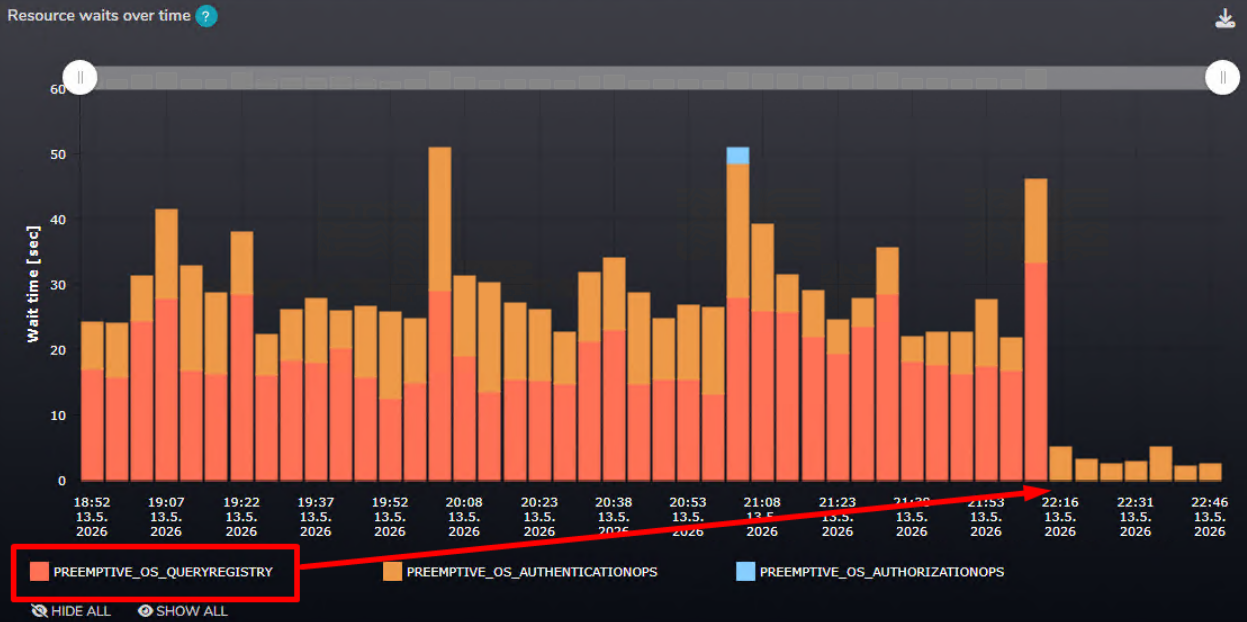
CPU usage stabilized, and Query Store was able to continue its job of tracking performance metrics smoothly without overwhelming the OS registry.
Have you encountered this strange wait type since upgrading to SQL Server 2022? Let us know in the comments, and now you know exactly how to defeat it!